
The Benefits of RAW Format
The advantages and disadvantages of the raw format generate a lot of interest. People may have heard that raw produces a higher quality image than JPEG. Others may have heard rumors that raw processing utilizes a complicated workflow. Yet, beyond this, raw may seem like a mystery to many. However, to those knowledgeable about raw, there is nothing mysterious about it. Raw has certain advantages, as well as disadvantages, over other photographic file formats for very specific reasons that can be traced back to the photographic equipment and processes deployed in commercial photography. By understanding these advantages and disadvantages, and the reasons for them, photographers can make intelligent decisions about whether utilizing raw makes sense for their applications.
This article will deal with two questions:
– What is raw?
– What are the advantages and disadvantages of raw? Since raw images are usually converted into TIFF for further image editing, TIFF files are part of the raw process. Therefore, the reader should keep in mind that when TIFF files are discussed in this article, it is actually the raw process that is being covered.
Specifically, this article will deal with the advantages and disadvantages of raw as compared to JPEG. This is because JPEG is the primary alternative to raw.
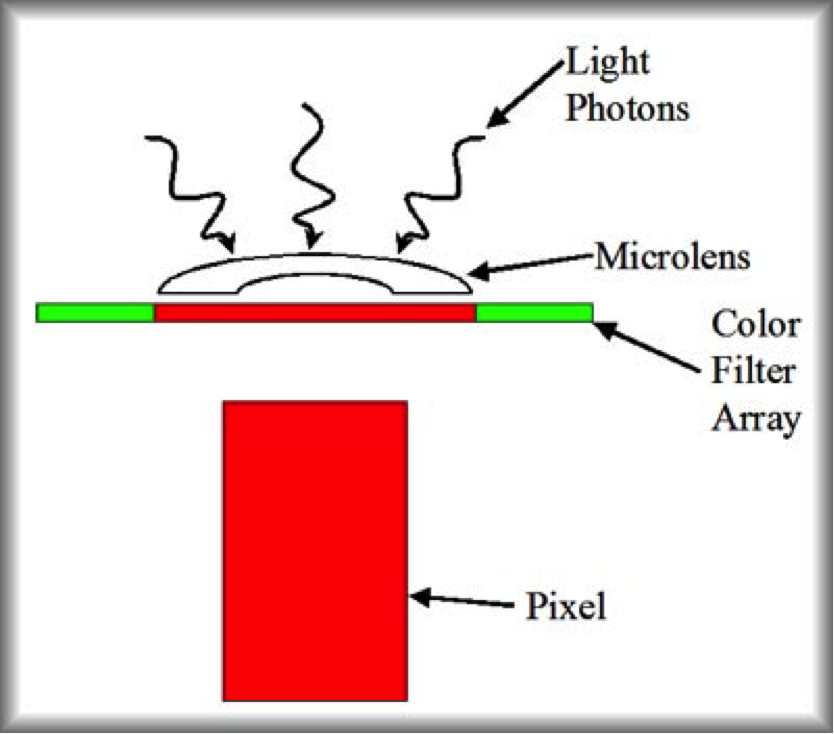
Figure 1: Pixel Diagram | Architectural Photographer Berkshire
What is Raw?
To understand what raw is all about, we first need to understand a little about what is inside of a digital camera and what the camera must go through to produce an image.
Within each digital camera is a small chip called a sensor. Despite its small size, this sensor is the most expensive and complicated part of the digital camera. The sensor is the device that collects and processes the light that is used to create an image; it takes the place of the film that is used in traditional cameras for architectural photographer berkshire. Each sensor is composed of an array (rectangle) of tiny pixels (photodiodes). Each pixel is composed of a light sensitive semiconductor material.
Figure 1 shows a greatly simplified diagram of a pixel. Light, in the form of photons (tiny packets of light) arrives at the pixel. The light from a slightly larger area than the active part of the pixel is focused by a microlens. The light then passes through a color filter array (also known as a Bayer filter, more about this later). Finally, the light enters the pixel. At this point, the light interacts with the semiconductor material of the pixel to create an electrical charge.
The pixel now has an electrical charge. Of course, the same thing was happening with all of the other pixels in the sensor. For example, in the case of a six megapixel camera, there would be approximately six million pixels, each with its own electrical charge, waiting to be processed into a beautiful commercial photography image.
Now that the pixels have all those electrical charges, the work of processing those charges into meaningful information that can be used to create an image begins. Figure 2 shows a simplified flowchart of the raw process and subsequent processing. Figure 3 shows a simplified flowchart of the JPEG process.
In step 2, what is happening is that the photons transfer their energy to the electrons in the valence orbits of the semiconductor molecules. This gives the electrons enough energy to move to the conduction band. This creates an electron hole pair. A voltage is applied to the photodiode (pixel) that creates a current that moves the electrons to a place where they are stored until their charge can be measured.
Let’s go over the steps, in Figure 2, that create a raw file.
1. The light photons reach the sensor.
2. The voltages are amplified (increased in magnitude).
3. Here comes the first surprise. Up until step 5, the digital camera has not been digital at all — it has been collecting and measuring analog data. In step 5 and step 6, the ADC (analog to digital converter) changes the analog, voltage information into digital information. In step 5, the ADC carries out the first step of the conversion by converting the voltage information into discrete numbers (for an explanation of analog, discrete, and binary numbers see the box “Analog, Discrete, and Digital Data” below).
4. The ADC now carries out the second step of the conversion by converting the discrete data into digital data. At the end of step 6, the raw file has been created. All of the subsequent steps are carried out on the raw file in the raw converter.
5. Here comes the second surprise. That expensive digital camera that you bought that produces those beautiful color prints is colorblind. It can neither see nor measure color. All of those pixels measure only the intensity of light. In a sense, the pixels are only measuring tones of gray. So, how are the colors produced? Through filters and software magic. If you look back at Figure 1, you will notice that there is a color filter array sitting above the pixel. This filter array filters the light so that each pixel sees only one of three colors of light. Some of the pixels see only red light, some only see green light, and the others only see blue light. In step 7, software looks at each pixel and determines the light intensity of the color of light at that pixel. The software also looks at the light intensity at each of the pixel’s neighboring pixels (which will have their own colored light levels). Using this information, the software calculates a color for each pixel and assigns that color value to the pixel. This process is called Bayer interpolation.
6. White balance adjustments are made. This step corrects for the color of the light that is illuminating the objects being photographed.
7. At this point, the image data is very dark. A tonal curve is now applied to lighten the image and make it look more natural.
Now the question, “What is raw?” can be resolved. An analysis of Figure 2 will reveal the answer. The raw process ends at step 6. At this point, the data from the sensor has been converted into digital format — that is all. An important point is that the data is still in rather pure form. Only minimal processing has been performed to convert the pixel information into digital format. No other processing has occurred — no colors have yet been assigned by Bayer interpolation, no white balance has been assigned, and no tonal curve has been applied.
Figure 2 also dispels a raw myth. It is sometimes said that raw data is the data straight from the pixels with no processing at all performed. This is incorrect. The data straight from the pixels is unamplified, analog, voltage data. Raw converters can not even read this data. It must first be amplified and converted to digital before it is ready for raw output.
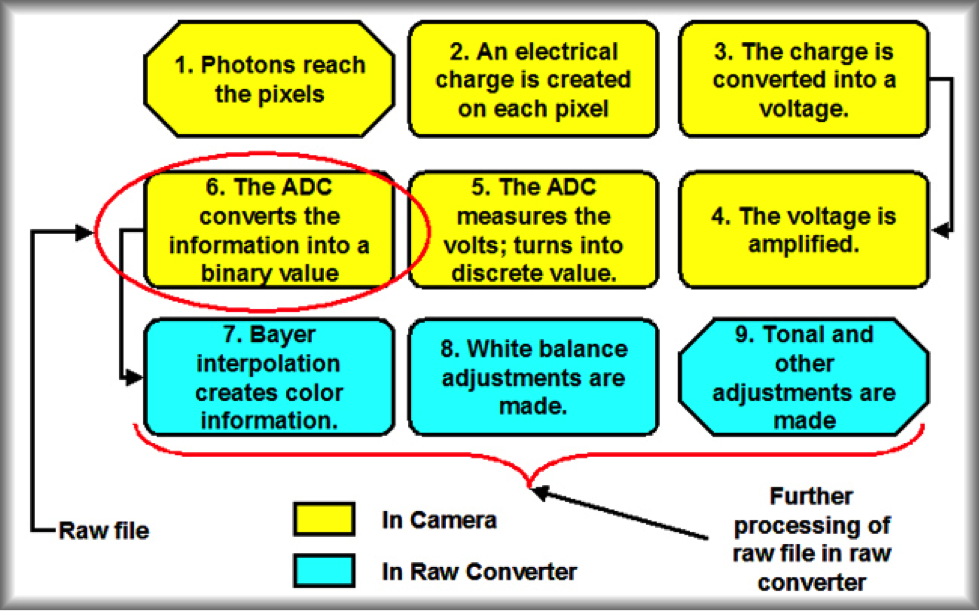
Figure 2: RAW Process | Architectural Photographer Berkshire
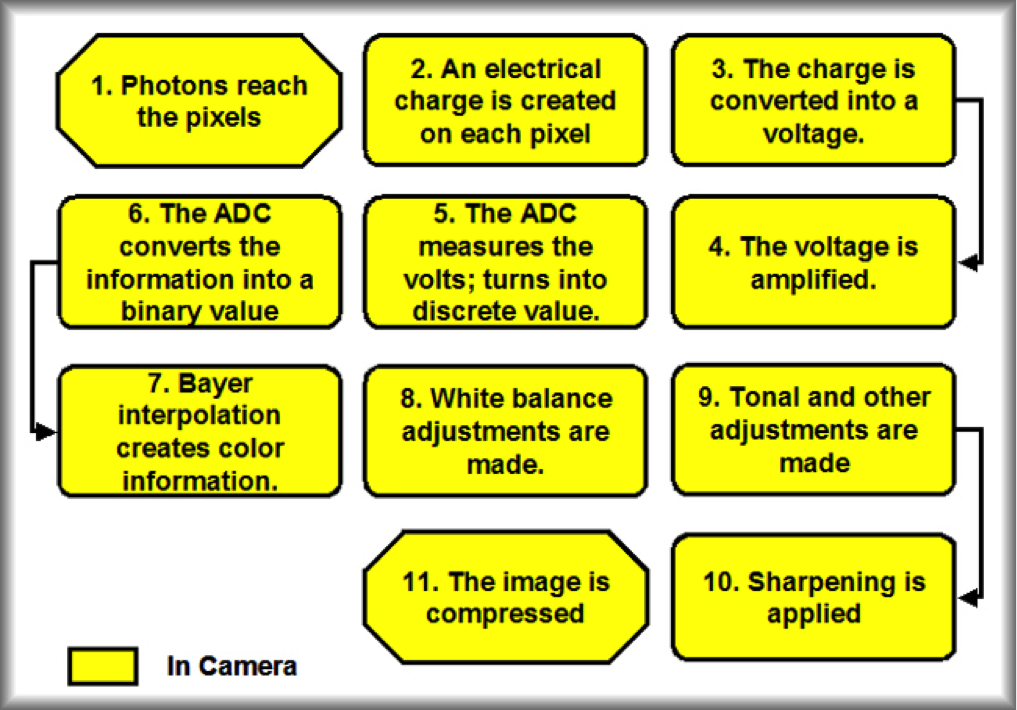
Figure 3: JPEG Process | Architectural Photographer Berkshire
We can now look at the steps, in Figure 3, that create a JPEG file (the steps in red are the same as raw processing).
- The light photons reach the sensor.
- The photons create electrical charges on the pixels.
- The electrical charges are accumulated and stored. These electrical charges create voltages.
- The voltages are amplified (increased in magnitude).
- The ADC converts the voltage information into discrete numbers (for more detail, see step 5 in the raw process outline above).
- The ADC converts the discrete data into digital data (for more detail, see step 6 in the raw process outline above).
- The Bayer interpolation calculates a color for each pixel and assigns that color value to the pixel (for more detail, see step 7 in the raw process outline above).
- White balance adjustments are made. This step corrects for the color of the light that is illuminating the objects being photographed.
- A tonal curve is now applied
- The image is sharpened
An analysis of these two processes should lead to an understanding that the raw process creates a relatively elemental file that has had very minimal processing and that requires additional processing to produce an image while the JPEG process creates a more finished file that has had a significant amount of processing.
Raw Advantage #1: Flexibility
Analog, Discrete, and Digital Data
As if numbers weren’t confusing enough, it turns out that there are different types of numbers. Analog numbers are the type of numbers most people think of when they think of numbers (many people try not to think of numbers at all). Perhaps the best way to think of analog numbers is that they can have fractional or decimal parts. For instance, you can buy 2.5 lbs of rice or 3.7 lbs if that is what you want. These are analog numbers.
Discrete numbers generally do not have fractional parts (when they do, they can only have specific values; however, we will not get into that in this article). For instance, a classroom can have 29 or 30 children, but it can not have 29.3 children. These numbers are discrete. Sometimes, analog numbers are rounded off to be discrete. For instance, some cars now have discrete speedometers. They will show that you are going 57 or 58 miles per hour. They do not show that you are going 59.7. Instead, they will round it off to 60.
Digital numbers are discrete numbers that use only 0 and 1 to represent data. For instance, in digital format, the number 7 is represented as 111. This format is used because it is easier for electronic devices to calculate using digital numbers.
One of the biggest advantages of raw is flexibility.
When a photographer shoots JPEG for commercial photography, the white balance, tonal curve, sharpening, compression, and other choices are essentially burned into the file. The sharpening and compression are irreversible (you can blur the JPEG image to reduce the sharpening, but that is not the same as undoing the sharpening and it will degrade the image). Color and tonal problems created by improper white balance or tonal curve can be adjusted somewhat in a JPEG file, but it will cause some degradation of the image. The problem arises because the camera sets these parameters into the image at the time the photo is taken. Making changes to these parameters at a later time can be difficult (e.g., loss of detail in the shadows due to the use of a contrasty tonal curve) or impossible (e.g., undo file compression).
On the other hand, for raw files, the white balance and tonal curve are handled in the raw converter (sharpening can be handled in the raw converter or in an image editing program). The photographer sets the parameters at the time of conversion. If the photographer decides to use a different setting, she can simply change the setting and reconvert the image (e.g., if the image had a loss of shadow detail due to a contrasty tonal curve, the photographer could simply reconvert the file with a less contrasty curve). In fact, she can reconvert the image as many times as she wishes with different settings. There will be no degradation of image quality because the original raw image is never changed. Every time a conversion is performed, a new file is created that has all of the settings incorporated into it. Thus, white balance, tonal, and sharpening issues can be more easily dealt with in raw.
Raw Advantage #2: Bits
It is often said that raw offers quality advantages over JPEG. This is a true statement. There are a number of reasons for this. However, by far, the biggest reason that raw has a quality advantage over JPEG has to do with bits. If you are not familiar with digital numbers, I suggest that you read the “Digital Numbers box before proceeding further.
Digital Numbers
Before we look at bits, let’s review the number system that we generally use. Our number system is built up of units of information. In this case, a unit is a single number that can not be broken down any further. For example, the number 7 is made up of a single unit. The number 24 is made up of two units (the 2 followed by a 4). The number 864 is composed of three units.
One unit of information can give us ten values (0 to 9). Two units of information can give us 102 = 10 x 10 = 100 values (0 – 99). Three units of information can give us 103 = 1,000 values (0 – 999).
The same logic can be followed in digital format where a single unit of information is called a bit. The main difference is that digital format is a binary number system. That means that each bit can only take on two values, either a 0 or a 1. Therefore one bit can give only two values (0 – 1). Two bits can give 22 = 4 values (0 – 3). Three bits can give 23 = 8 values (0 – 7).
JPEG files are eight bit. That means that each pixel can register 28= 256 levels of light intensity. In other words, each pixel can render 256 shades. Traditionally, 0 represents pure black and 255 represents pure white. As you go from 0 to 255, the shades go from dark to light. Previously, it was mentioned that some pixels measured red light, some green, and some blue. Therefore, there are 256 possible shades of red, 256 of green, and 256 of blue. When the Bayer interpolation does its magic to calculate a color for each pixel, it uses the color information for the pixel and its neighboring pixels. Since the interpolation is using information from all three colors, there are 2563 = 16,777,216 possible colors with an eight bit JPEG file. That sounds pretty impressive — until you compare it to raw.
Most raw files are twelve bit (for the sake of simplicity, the rest of this series of articles will assume the raw files that are being discussed are 12 bit). That means that each pixel can register 212 = 4,096 levels of light intensity. Now, when the Bayer interpolation does its magic, there are 4,0963 = 68,719,476,740 possible colors. That is 4,096 times more colors than JPEG!
It turns out that the human eye can only see about 16,000,000 colors — about what the JPEG file has. In other words, the human eye can not tell the difference between many of the extra colors that raw produces. So, if we can not see all the extra colors that the raw format produces what’s the big deal about raw producing better quality images? Well, it turns out that the sensor in the camera that you paid so much for pulls a dirty, little trick on you.
The little trick is that most digital camera sensors are linear devices. What that means is that when the amount of light that reaches a sensor is doubled, the output of the sensor is doubled. That sounds innocuous enough. Actually, it causes some major issues, especially for JPEG. The problem starts to reveal itself when we look at bits in conjunction with the dynamic range of the sensor. Dynamic range is a measure of the span of tonal values over which a device (in this case a sensor) can hold detail. In other words, it is the tonal distance from the darkest point at which the device holds detail to the lightest point. Dynamic range is measured in stops of light. When light is increased by one stop, the amount of light is doubled (going in the other direction, it is cut in half). For instance, a photographer may say that he doubled his exposure by opening up the lens by one stop.
At the current time, the sensors in the better digital cameras have a dynamic range of about five to eight stops. For our purposes, we will assume that you have a camera with a dynamic range of five stops. The shades that an individual sensor can render in a file must be spread across those five stops. The problem is that those shades are not spread evenly across the dynamic range of the camera. Let’s do a little analysis for a pixel that will output its data to a JPEG file. For this analysis, if you keep in mind the data that Figure 3. In other words, these numbers represent the state of the information before any tonal curves (i.e., gamma or transfer function) have been applied. They do not represent the final file. The first section of Part II of this article will detail how the tonal curve affects these numbers and what the numbers in the final file will look like. Suppose that a pixel was exposed until it could accept no more light (this would be from an area in the scene being photographed that was very bright).
In the case of our five stop dynamic range camera, the pixel would receive five stops of light. At this point, the pixel would be full. This pixel would have reached its full well capacity. Pixel A in Figure 4 shows such a pixel at full well capacity. Now, most better digital cameras have twelve bit ADCs; therefore, this pixel is capable of rendering 4,096 shades as covered above. However, as the data is converted to JPEG format, it will be reduced from twelve to eight bits. Therefore, the data from this pixel would only be able to render 256 shades once it is in JPEG format.
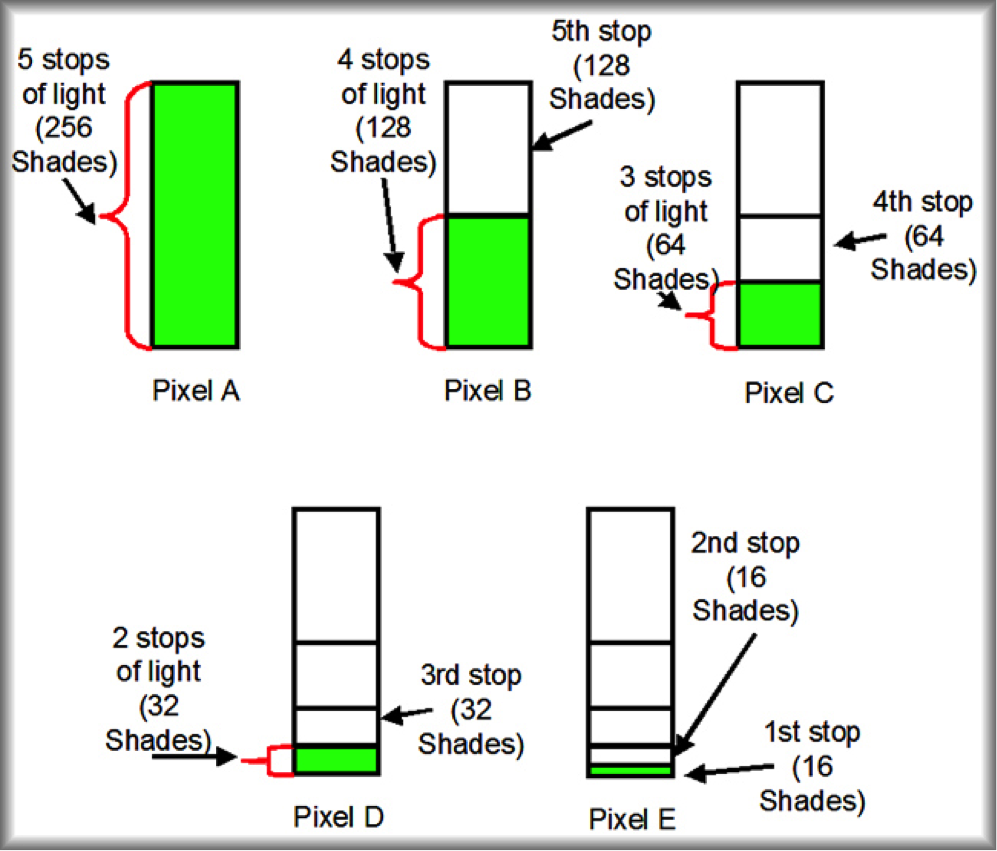
Figure 4: Shades vs. Stops of Light for JPEG
As we move on to analyze the next pixels in Figure 4, the key to understanding what is happening is to remember that each time the exposure is reduced by one stop, the light is reduced by half. Since sensors are linear devices, when the light is reduced by half, the sensor will only be able to render half as many shades.
Now, suppose that pixel B in Figure 4 received its light from an area in the scene that was somewhat darker. For our example, the pixel would be given four stops of light (half as much light as pixel A). Since sensors are linear, and Pixel B got only half as much light, it would be able render only half as many shades. Thus, the data from pixel B would be able to render only 128 shades. Since pixel A’s five stop exposure rendered 256 shades, and pixel B’s four stop exposure rendered only 128 shades, the fifth stop of light was responsible for rendering the other 128 shades. In other words, the brightest stop of dynamic range (the fifth stop) used up half of all the available shades.
The procedure repeats itself with pixel C. The light is reduced by one more stop so that the pixel receives three stops of light. Since pixel C receives only half as much light as pixel B, it would be able to render only half as many shades. Accordingly, pixel C would render 64 shades. Since pixel B’s four stop exposure rendered 128 shades, and pixel C’s three stop exposure rendered only 64 shades, the fourth stop of light was responsible for rendering the other 64 shades as shown in Figure 4. In other words, the second brightest stop of dynamic range (the fourth stop) used up one fourth of all the available shades.
At this point, we can see that the two brightest stops in a five stop dynamic range camera render 75% of all the shades the camera is capable of producing. Pixels D and E in Figure 4 show that, as we continue to work down the dynamic range, the camera is capable of rendering less and less shades. Eventually, one stop of light is reached. This last stop of light is capable of rendering only 16 shades.
The exact same process can be carried out for a pixel that will output is data into a raw file. The difference is that the raw processing leaves the data as 12 bits (rather than changing it to 8 bits like JPEG). Thus, a pixel that reached its full well capacity and has its data processed as raw starts off with 4,096 shades.
The shades of color are not evenly distributed over the five stops of dynamic range. More of the shades are allocated to the brightest areas, and far fewer shades are allocated to the darker areas. The news is not good for the JPEG user. The pixels that were exposed to only one stop of light rendered only sixteen shades for the shadow areas in the JPEG image. On the other hand, the raw user got 256 shades allocated to the shadows.
What this means is that the JPEG file has fewer shades of each of the three colors with which to create shadow detail than the raw file. This problem now gets compounded by the human visual system. While the sensor may be a linear device, the human visual system is not. The human visual system is more sensitive to some amounts of light than others. In particular, the human visual system is more sensitive to shadows than highlights. What this means is that increasing the amount of light in a shadow area will register a larger impact on the visual system than increasing the amount of light, by the same percentage, in the highlights. We now have a situation where we have the least amount of data in the area where the visual system is the most sensitive, and this problem is the greatest for the JPEG user.
This article shows the quality and variety of techniques that customers benefit from as part of our commercial photography and architectural photographer berkshire service. Call now to discuss your requirements and timescales on 079101 68536.
We work hard to create images that our customers love. You may also find our Interior, residential, commercial and installation photography portfolios interesting as well as the small selection of our hotel projects. Some of our customers have been kind enough to provide testimonials. Our blog posts, that explain our commissions in greater detail may be of interest to you. We enthuse about the amazing interiors, venues and construction installations that we become involved in capturing. High profile examples are the Nottingham Trent University Pavilion, National Graphene Institute and Royal Ascot Racecourse. Also the West Bromwich, Sandwell College and Putney High School Performing Arts Centre. The MAKO Derivatives, Broadgate, London interior and the stunning Ben Pimlott Building, Goldsmiths College, London.
© Copyright Adam Coupe Photography Limited 2017
Get In Touch
Please leave your name and email below along with what you are looking for in the message box. Or you can call us on 0118 989 3749 and 07910 168536
Follow